KARLAUDIO

Pitch Engine

Pitch that stays a voice.

Pitch Engine corrects vocals and plays samples from the note you sing. Formants stay put. Windows VST3 and standalone.

Unlimited demo. The audio cuts out every 45 seconds. Activate the license inside the plugin.

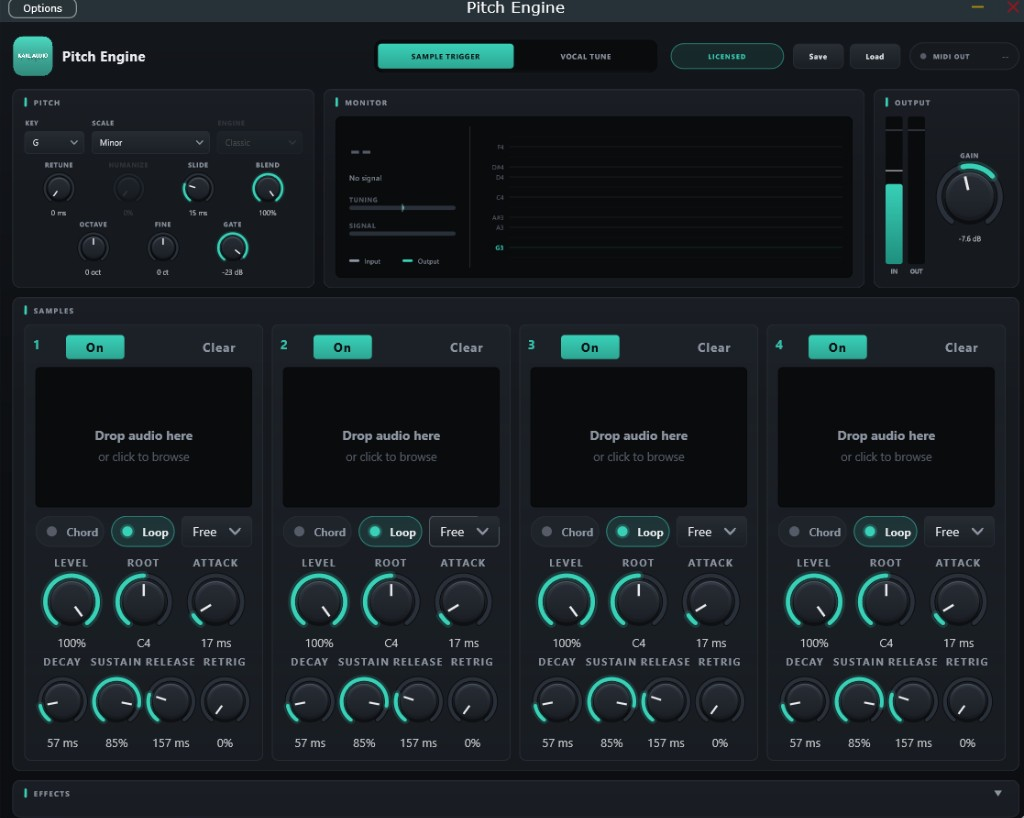
Pitch Engine plugin window with pitch controls, a pitch monitor, and four sample slots.

Three facts

  • Natural or Classic correction
  • Four pitch-following sample slots
  • Unlimited demo

What it does

Vocal Tune

  • Pulls the vocal onto a scale: major, minor, harmonic minor, pentatonic, dorian, blues, or chromatic.
  • Natural engine keeps the singer’s formants, so the voice does not turn thin or huge when the pitch moves.
  • Classic engine is zero latency, for tracking with headphones.
  • Retune speed, humanize for sustained vibrato, and a gate so noise is ignored.

Sample Trigger

  • Up to four samples follow the note you sing.
  • Each slot has level, root note, envelope, chord, and its own loop.
  • Drag the loop edges to resize. Drag the highlighted region between them to slide the loop without changing its length.
  • Loop length can follow the song tempo, from a 1/16 note up to 2 bars.
  • Sends the detected note out as MIDI.

Effects

Drive

Tape, tube, soft clip, hard clip, fold, or bitcrush. Mixed without the thin comb-filter sound of a bad oversampler.

Filter

Low pass, high pass, band pass, or notch. 12 or 24 dB per octave.

EQ

Low shelf, mid peak, and high shelf.

Delay

Digital, ping-pong, tape, or lo-fi. Clear keeps the repeats out of the vocal and lets them play in the gaps.

Reverb

Room, plate, hall, or ambient. Size, decay, pre-delay, tone, and width.

Arpeggiator

Plays an arpeggio from the note you sing.

Demo and license

The demo does not expire. The audio cuts out every 45 seconds until a license is activated.

One key works on up to 3 computers. Music you make with it is yours. No royalties.

  1. Download Pitch Engine. The installer is free.
  2. Install and open the plugin. The demo runs inside it.
  3. Buy a license when you want to keep it.
  4. In the plugin, click the demo badge, paste the key, and press Activate.

The internet is needed once, to activate the license.

Install

  • Download the free installer.
  • Windows 10 or 11, 64-bit.
  • VST3 for your DAW, plus an optional standalone app.
  • In FL Studio: Options, Manage plugins, Find plugins, then load Pitch Engine by KarlAudio as an effect.